Difference between revisions of "Channel System"
Jump to navigation
Jump to search

Njosefbeck (talk | contribs) (Add PT link) |
Njosefbeck (talk | contribs) (→Channel Creation and Administration: Add colors screenshot) |
||
| Line 39: | Line 39: | ||
* <code>@channel create <#channel_name> <password></code> creates a temporary channel with a password | * <code>@channel create <#channel_name> <password></code> creates a temporary channel with a password | ||
* <code>@channel setcolor <#channel_name></code> changes a channel's color | * <code>@channel setcolor <#channel_name></code> changes a channel's color | ||
* <code>@channel list colors</code> lists all available colors; available colors are | * <code>@channel list colors</code> lists all available colors; available colors are: | ||
* | * [[File:Channel colors.png|none]] | ||
* <code>@channel ban <#channel_name> <character name></code> bans a character from the channel | * <code>@channel ban <#channel_name> <character name></code> bans a character from the channel | ||
* <code>@channel unban <#channel_name> <character name></code> unbans a character from the channel | * <code>@channel unban <#channel_name> <character name></code> unbans a character from the channel | ||
* <code>@channel banlist <#channel_name></code> lists all characters banned from the channel | * <code>@channel banlist <#channel_name></code> lists all characters banned from the channel | ||
* <code>@channel setopt <#channel_name> JoinAnnounce 1</code> enables join messages for the channel; setting it to <code>0</code> disables it | * <code>@channel setopt <#channel_name> JoinAnnounce 1</code> enables join messages for the channel; setting it to <code>0</code> disables it | ||
==References== | ==References== | ||
Revision as of 21:37, 8 June 2018
Read this article in the following language(s):
| Português |
Hercules comes with an inbuilt channel system for global chat[1].

How to type to a channel
You need to join a channel to see messages in it; when logging in, you will automatically join certain channels, others you will have to join manually.
These settings can be changed via the Titan Guide, which will open an NPC dialogue where you can toggle autojoin for every channel in the Login Settings.
Existing Channels
Joined by default:
#mainis for general global chat (Note: As per the rules, only English is allowed in this channel.)#tradeis for all sell/buy/trade messages#offtopicis for chat not related to RO#partyis for party search#mapenables chatting with other players on the same map
Language-specific channels:
#deis for German chat#esis for Spanish chat#fris for French chat#ptis for Portuguese chat#tlis for Tagalog chat
General Commands
@channellists all channel-related commands@channel listlists all public channels@channel bindto <#channel_name>binds your global chat to a specific channel, making everything you type that would normally displayed to nearby characters be redirected to that channel instead@channel unbindunbinds your global chat from the current bound channel
Joining and Leaving
@join <#channel_name>joins a public channel@join <#channel_name> <password>joins a private channel@channel leave <#channel_name>leaves a channel
Channel Creation and Administration
@channel create <#channel_name>creates a temporary channel, which disappears when the last member leaves@channel create <#channel_name> <password>creates a temporary channel with a password@channel setcolor <#channel_name>changes a channel's color@channel list colorslists all available colors; available colors are: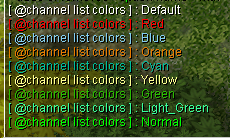
@channel ban <#channel_name> <character name>bans a character from the channel@channel unban <#channel_name> <character name>unbans a character from the channel@channel banlist <#channel_name>lists all characters banned from the channel@channel setopt <#channel_name> JoinAnnounce 1enables join messages for the channel; setting it to0disables it
